NinoGaming Payment Proof Verification and Receipt Guide
Learn how to save 13-digit transaction reference codes on NinoGaming. Keeping clear payment receipts ensures rapid manual crediting if delays occur.
Why Capturing Payment Proof Is Essential for Every Player
Mobile banking across the Philippines is remarkably robust, but cellular data interruptions and network lag can occasionally happen. When a mobile connection drops right as you tap "Pay", an automated payment confirmation webhook might fail to reach the casino server.
In that moment, your payment receipt is your complete financial insurance policy. Treating your digital transactions with basic record-keeping diligence guarantees that not a single centavo of your money is ever lost.
Treating Mobile E-Wallet Transactions with Professional Diligence
Whether you are ordering food on Grab, shopping online, or funding your online gaming account, taking a quick screenshot of completed payment confirmations is good financial hygiene.
A quick tap of your phone's power and volume buttons captures an authenticated digital snapshot of the transaction. This five-second habit gives you permanent evidence of your transfer.
How a Single Screenshot Guarantees 100% Balance Recovery During Network Lags
If an internet glitch prevents your gaming balance from updating automatically, customer support agents cannot blindly take your word without verification. However, presenting an standard receipt completely changes the dynamic.
A clear screenshot containing an authenticated reference number gives the support team the exact cryptographic token needed to query the payment gateway and credit your account immediately.
The Anatomy of a Valid Electronic Payment Receipt
Not all screenshots provide the necessary data for support agents to verify a transfer. Understanding what information must appear on your receipt ensures your inquiry clears on the first try.
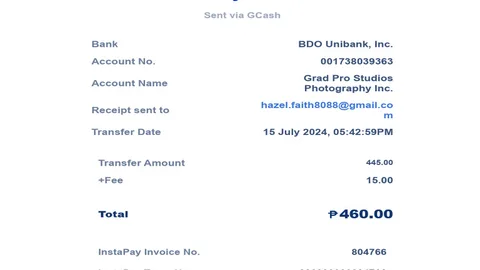
Here are the vital elements that make up an authenticated payment confirmation.
The Crucial Thirteen-Digit GCash Reference Number or Maya Transaction ID
The single most important piece of data on any Philippine e-wallet receipt is the reference number. In GCash, this is a thirteen-digit unique numeric code (such as 1002 9845 1204 3); in Maya, it is a twelve to sixteen-digit alphanumeric string.
This reference number is generated directly by the financial switch. It cannot be duplicated or forged, serving as irrefutable proof that money left your wallet and entered the merchant's account.
Verifying Timestamp Accuracy, Exact Amount, and Destination Name
A complete receipt must clearly display the date and time of the transaction down to the minute. It must also show the exact transfer amount in Philippine Pesos (for example: ₱500.00) and the recipient account name.
Support agents cross-reference this timestamp and amount against incoming portal bank records to locate the matching unassigned transaction within seconds.
Ensuring the Transaction Status Clearly Reads "Completed" or "Success"
Ensure that the screenshot shows the final transaction outcome. Receipts that read "Pending", "Processing", or "Failed" indicate that funds have not yet cleared the originating banking network.
Only receipts marked with green "Completed" or "Payment Successful" badges represent fully settled transfers eligible for instant manual balance crediting.
The Live Chat Escalation Protocol for Missing Balance Credits
If your deposit has not reflected in your balance after five minutes, follow this structured escalation procedure. Our partner portals maintain dedicated twenty-four-seven support teams trained to handle payment inquiries quickly.
Following these steps ensures your ticket is handled with maximum efficiency.
Opening the Twenty-Four Seven Customer Support Live Chat Window
On your mobile browser or desktop screen, tap the floating Live Chat icon located at the bottom-right corner of the page. Select "Deposit Issue" or "Payment Inquiry" from the initial menu.
You will be connected to a live customer service representative, usually in under thirty seconds.
Pasting the Full Reference Number in Text Format Alongside the Screenshot
Here is an insider secret for lightning-fast support resolution: send both the image and the reference number in text. Type: "Good day, my GCash deposit of ₱500 has not credited yet. Reference Number: 1002984512043. Here is the receipt."
Providing the number in plain text allows the agent to copy-paste it directly into their database query tool without manually typing thirteen digits from your image. This cuts your resolution time in half.
Standard Five-to-Ten Minute Manual Verification and Balance Credit Timeframe
Once the agent queries the gateway database and confirms the transaction reference, they will manually override the unassigned status and push the credits into your account balance.
In most cases, the entire conversation—from opening chat to seeing your balance updated—takes less than five to ten minutes. You can then immediately close chat and enjoy your games.
Having clear, verifiable transaction documentation eliminates back-and-forth ambiguity and empowers support agents to solve your issue on the very first contact.
Remember that professional customer support desks prioritize tickets accompanied by valid merchant reference receipts.
Best Practices for Managing Digital Receipts on Your Smartphone
Keeping your mobile receipts organized requires minimal effort and saves immense headaches. Adopt these simple smartphone management habits for smooth mobile gaming.
These practical steps ensure you always have transaction proof at your fingertips.
Creating a Dedicated Gaming Receipts Photo Album on Mobile
On your smartphone photo gallery, create a dedicated folder titled "Gaming Receipts". Whenever you screenshot a cash-in or withdrawal confirmation, move it directly into this album.
If you ever need to verify a past transaction, you can find the receipt in three seconds without scrolling through thousands of personal family photos.
Retaining Transaction Screenshots Until Successful Account Crediting
A good rule of thumb is to retain transaction screenshots until the funds successfully reflect in your gaming balance or e-wallet account.
Once your balance updates and your gaming session begins, you can safely delete the screenshot to keep your phone storage tidy. Simple diligence guarantees complete financial peace of mind.
Automated Email Confirmations and Dispute Escalation Tiers
Beyond mobile photo screenshots, modern e-wallets provide secondary digital verification channels. If you accidentally delete a screenshot, these backup records ensure you still have proof of transfer.
Understanding these secondary paper trails allows you to resolve disputes with complete confidence.
Checking Linked Email Statements and PDF Invoices
Both GCash and Maya allow users to link an active email address to their profiles. When enabled, the platform automatically emails an PDF transaction invoice for every completed merchant checkout.
If you forgot to capture a screen photo before closing the app, simply open your email inbox, search for "GCash" or "Maya", and download the PDF receipt containing the transaction reference number.
The Three-Tier Support Dispute Escalation Process
Partner gaming portals maintain a clear dispute escalation hierarchy. Tier 1 live chat agents verify standard reference codes and credit balances within five to ten minutes.
In the rare event of an interbank transmission mismatch, the ticket escalates to Tier 2 finance supervisors who contact payment gateway aggregators directly. Every legitimate transaction is resolved with full mathematical accountability.
Frequently Asked Questions
Where can I find my GCash reference number if I forgot to screenshot it?
Open your GCash app, tap the 'Inbox' icon at the top right, and navigate to the 'Activity' tab. Locate your transaction and tap on it to view and screenshot the digital receipt with the 13-digit reference number.
Can I copy-paste the reference number or must I send an image?
It is best to send both. Pasting the text reference number allows the support agent to immediately query the database, while the screenshot provides visual verification of date and amount.
What if customer support says the reference number is not in their system?
This can happen if cellular data lagged during transfer. Verify that the money actually left your e-wallet balance. If it did, ask the agent to escalate the ticket to the senior finance supervisor for a manual gateway reconciliation.
How long should I keep transaction screenshots on my phone?
You only need to keep the screenshot until the deposited funds reflect in your playable balance, or until a cash-out lands in your e-wallet. After that, you can safely delete it.
Can customer support credit my account without a reference number?
No. Security and compliance policies strictly require a verifiable reference number to prevent fraudulent duplicate claims. Always save your receipt.
Manage Your Gaming Balance Today
Transfer funds securely via GCash, Maya, and local bank transfers with zero hidden deductions and rapid turnaround on partner portals.