NinoGaming Daily Payment Limits and E-Wallet Tiers Guide
Review minimum and maximum transaction caps on NinoGaming. Deposits start at ₱100, with daily limits scaling according to your e-wallet verification tier.
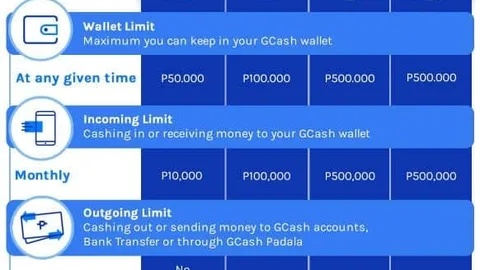
Understanding Philippine E-Wallet Tier Limits
Managing your gaming bankroll requires a clear understanding of domestic e-wallet regulations. In the Philippines, the Bangko Sentral ng Pilipinas enforces strict capacity tiers on digital wallets to protect consumers against financial fraud.
Whether you use GCash or Maya, your account verification status directly dictates how much money you can deposit, hold, and withdraw each calendar month. Bumping into an unexpected limit can temporarily freeze your gaming cash-outs.
Basic Unregistered accounts: Severe Inbound and Outbound Restrictions
When you first create a GCash or Maya account using only your mobile number, your account starts at the Basic tier. At this entry level, your cumulative inbound transaction limit is restricted to just ₱10,000 per month.
More critically, unregistered accounts cannot send money to external bank accounts or receive automated merchant disbursements. Attempting to withdraw online casino winnings into an unpersonal e-wallet will cause the transaction to fail immediately.
Fully registered accounts: One Hundred Thousand Pesos Monthly Flow
Upgrading to fully upgraded status removes entry-level restrictions. For GCash, your monthly inbound cash flow expands to ₱100,000, unlocking standard Send Money features, merchant payments, and automated payout reception.
This tier easily accommodates the regular recreation of the vast majority of Philippine players. You can deposit ₱500 on weekends and withdraw ₱5,000 without ever worrying about hitting monthly ceilings.
Upgraded Payroll or Merchant Tiers: Capacity Reaching Five Hundred Thousand Pesos
For high-volume players and gaming enthusiasts, linking a formal bank account (such as BPI, UnionBank, or RCBC) or enrolling in Maya digital banking unlocks the highest consumer tier. This tier raises your monthly flow capacity to ₱500,000.
With half a million pesos in monthly transaction capacity, you enjoy complete financial flexibility. Large jackpot cash-outs and multi-leg tournament prizes transfer cleanly into your balance without any wallet friction.
Gaming Portal Daily Transaction Caps
Beyond the limits enforced by your e-wallet app, licensed partner gaming portals maintain internal daily transaction ceilings. These policies ensure financial stability and support responsible gaming practices.
Understanding these thresholds allows you to plan your gaming activity smoothly across the week.
Minimum Deposit of One Hundred Pesos and Daily Ceilings
Partner portals welcome players of all budget levels with an accessible minimum deposit of ₱100. Single transactions can reach up to ₱50,000 per transfer.
There is generally no restriction on the number of deposits you can make in a day, provided you remain within your personal e-wallet capacity and your self-imposed entertainment budget.
Minimum Cash-Out of Two Hundred Pesos and One Hundred Thousand Daily Maximums
The standard minimum withdrawal is set at ₱200, allowing recreational players to collect modest wins whenever they wish. For standard member tiers, the cumulative daily cash-out maximum is established at ₱100,000 per twenty-four-hour cycle.
If you enjoy a substantial win of ₱250,000 on a lucky spin, you can cleanly withdraw ₱100,000 on day one, ₱100,000 on day two, and ₱50,000 on day three. Spacing out requests ensures prompt, uninterrupted automated queue processing.
This daily cap structure protects both player security and platform liquidity, preventing sudden unauthorized drainage if an account is ever compromised on an unsecured public device.
By scheduling your payouts across predictable daily increments, your funds flow smoothly into your e-wallet without triggering anti-fraud compliance freezes.
How High-Roller VIP Tiers Unlock Custom Withdrawal Allowances
Players who achieve VIP tier status through sustained loyalty unlock dedicated account managers and customized banking privileges. VIP members can request elevated single-ticket limits reaching ₱250,000 or higher.
Furthermore, VIP cash-outs are routed through priority processing channels, receiving express approval within minutes even during busy payday weekend evenings.
Preventing the Dangerous "Wallet Overflow" Trap
One of the most frequent customer support inquiries in Philippine online gaming involves the "wallet overflow" phenomenon. Understanding how this occurs prevents unnecessary panic over pending funds.
Here is what happens when your winnings clash with e-wallet capacity limits.
What Happens if a Casino Payout Exceeds Your Remaining GCash Monthly Limit
Imagine your GCash account has a ₱100,000 monthly limit, and you have already received ₱90,000 in personal salary and transfers this month. If you attempt to cash out ₱20,000 from your gaming balance, the incoming total would be ₱110,000.
Because the transfer exceeds your remaining ₱10,000 capacity by ₱10,000, GCash's automated banking switch will reject the transaction. The payout cannot legally settle into your wallet.
Being mindful of your overall financial activity across the month prevents this awkward situation from happening when you are ready to collect your gaming profits.
Why Exceeded Caps Cause Payments to Bounce Back to Gaming Portals
When GCash rejects the transfer, the payment bounces back to the gaming portal's accounting department. Your funds are not lost; they are safely returned to your gaming account balance.
To avoid this delay, always monitor your incoming transaction totals inside your GCash app before requesting a cash-out. Alternatively, maintain a secondary personal Maya wallet with available headroom.
Steps to Upgrade Your Verification Status Cleanly
Upgrading your GCash and Maya accounts to fully upgraded status takes less than ten minutes on your smartphone. Completing verification once unlocks lifelong banking ease for all your mobile gaming.
Follow these steps to complete your verification without document rejections.
Submitting Valid Philippine Government IDs (Passport, UMID, Drivers License)
Both GCash and Maya accept valid Philippine government-issued identification cards. The highest approval rates come from Philippine Passports, Unified Multi-Purpose IDs (UMID), Driver's Licenses, and the Philippine National ID (PhilSys ID).
Ensure the ID is laid flat on a clean, well-lit surface with zero glare or shadows before snapping the photo. All four corners of the ID card must be clearly visible within the camera viewfinder.
Completing In-App Biometric Facial Scans in GCash and Maya
After uploading your ID, the app will prompt you to complete a live selfie scan to confirm your identity against the ID photo. Ensure you are in a brightly lit room without hats, sunglasses, or face masks.
Automated AI verification typically processes and approves your submission within thirty minutes to twenty-four hours. Once approved, your limits instantly jump to ₱100,000+ monthly flow.
Managing Multiple E-Wallet Portfolios for Maximum Headroom
Experienced Philippine players rarely rely on a single payment method. Maintaining active accounts across both GCash and Maya gives you combined monthly capacity exceeding six hundred thousand pesos.
If your GCash approaches its monthly ceiling near the end of the month, you can smoothly switch your primary deposit and cash-out destination to Maya without interrupting your gaming sessions.
Separating Gaming Bankrolls from Everyday Household Budgets
One of the best financial habits for mobile gamers is dedicating a separate e-wallet solely to entertainment. Using Maya exclusively for gaming while keeping GCash for groceries, bills, and household expenses keeps your finances neatly organized.
This strict separation prevents accidental overspending and makes tracking monthly gaming profits and leisure costs effortless.
Frequently Asked Questions
What happens if my GCash monthly limit of ₱100,000 is reached?
If you reach your monthly incoming limit, any additional transfer into your GCash wallet will bounce back to the sender. Track your incoming transactions inside the GCash app or withdraw to a secondary personal Maya wallet.
Can I split a ₱150,000 withdrawal into two separate days?
Yes. To stay within the standard ₱100,000 daily withdrawal cap, submit ₱100,000 today and the remaining ₱50,000 the following day after midnight reset.
Do deposits count toward my monthly e-wallet limit?
Sending money out of your e-wallet counts against your monthly outbound spending limit, while casino cash-outs count against your inbound receiving limit.
How long does it take to fully verify a GCash or Maya account?
Automated biometric verification typically approves valid Philippine government IDs within 30 minutes to 24 hours directly inside the respective mobile application.
Can VIP players request higher withdrawal limits?
Yes. High-tier VIP members can coordinate with their dedicated account managers to raise single-ticket and daily cash-out thresholds up to ₱250,000 or more.
Manage Your Gaming Balance Today
Transfer funds securely via GCash, Maya, and local bank transfers with zero hidden deductions and rapid turnaround on partner portals.